

TL;DR
> Build AI agents in FlutterFlow using GPT-4, Google Gemini, or Anthropic Claude without backend coding.
> Step-by-step guide covers: choosing AI providers, configuring agents, connecting to Firebase, and deploying to iOS/Android/web.
> Best for: customer service automation, sales chatbots, educational tutors, and healthcare assistants. Unlimited agents on Pro/Team plans.
Remember when building an AI-powered app meant months of development, huge budgets, and a team of specialized engineers? Those days are over.
I've been watching the no-code revolution transform how businesses build software for the past decade. But nothing has changed the game quite like FlutterFlow's AI agent builder. What used to take six months and $200K in development costs now happens in weeks with a fraction of the budget.
According to FlutterFlow's latest community update, their AI agent builder now supports unlimited AI agents on Pro and Team plans, with direct integration to Google Gemini, OpenAI GPT-4, and Anthropic Claude. This isn't just another feature update; it's a complete shift in how conversational AI gets built.
The numbers tell the story. Businesses using FlutterFlow for AI development are seeing 60-75% faster time-to-market compared to traditional app development approaches.
More importantly, they're shipping products that users love, not just impressive demos.
But here's what really caught my attention: companies are building sophisticated AI agents that handle customer service, sales automation, and even complex workflows, all without writing a single line of backend code.
What Are AI Agents, and Why Use Them in FlutterFlow?
Let's get one thing straight AI agents aren't just fancy chatbots. I've seen too many businesses make this mistake and wonder why their "AI" solution feels robotic and limited.
AI agents are intelligent assistants that can maintain context, perform specific tasks, and help users accomplish goals. Think of them as digital employees that never get tired, work 24/7, and get smarter over time.
Here's the difference: A chatbot answers questions. An AI agent solves problems.
For example, a customer service chatbot might tell you store hours. But an AI agent can check your order status, process returns, recommend products based on your purchase history, and even escalate complex issues to human agents, all in one conversation.
Types of AI Agents You Can Build
Not all AI agents work the same way. Understanding the types helps you pick the right approach for your FlutterFlow project.
Simple reflex agents respond to specific inputs with pre-defined actions. A chatbot that answers FAQs based on keyword matching falls in this category. These are fast to build in FlutterFlow and work well for straightforward customer queries.
Model-based agents maintain an internal picture of the conversation and use it to make better decisions over time. FlutterFlow's conversation context management supports this pattern out of the box. Most customer service agents you build will fall here.
Goal-based agents work toward specific outcomes. A lead qualification agent that guides prospects through a discovery flow until it gathers enough information to score and route them is goal-based. These need careful system prompt design in FlutterFlow.
Learning agents adapt their behavior based on past interactions. While FlutterFlow doesn't yet support native machine learning loops, you can approximate this by storing user interaction data in Firestore and updating system prompts based on patterns you observe.
For EdTech applications, model-based and goal-based agents tend to deliver the best results. A student advisor agent, for example, needs to remember what topics a learner has covered (model-based) while guiding them toward mastery of a specific subject (goal-based).
Why FlutterFlow Changes Everything for AI Development
Traditional AI agent development is expensive and complicated. You need backend infrastructure, API management, conversation state handling, and deployment pipelines. Most businesses either can't afford it or spend months just on setups.
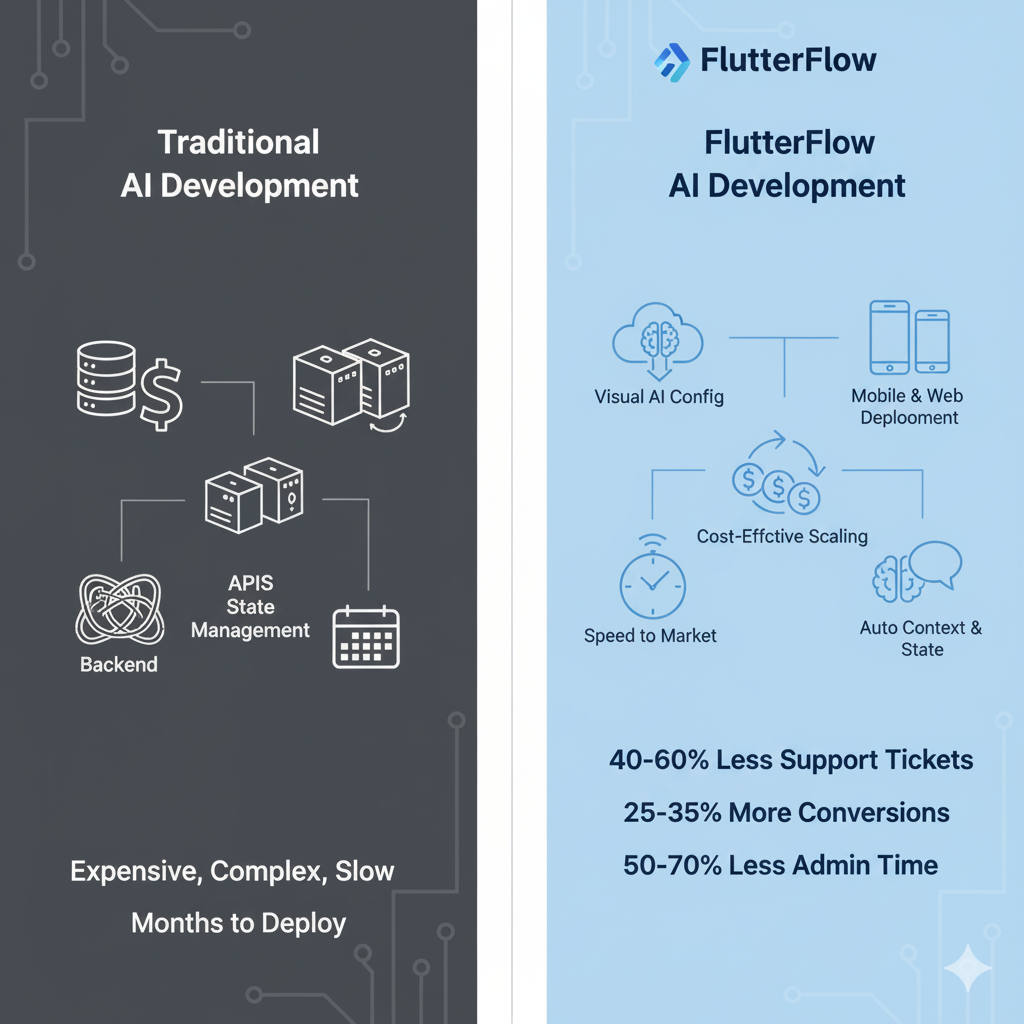
FlutterFlow flips this model completely. You get:
- Visual AI agent configuration. No coding required to set up intelligent conversations.
- Native mobile and web deployment. Your AI agents work everywhere users are.
- Built-in conversation management. Context and state handled automatically.
- Cost-effective scaling. Start small and grow without rebuilding everything.
- Speed to market. While your competitors are still writing requirements documents, you can have a working AI agent in users' hands.
I've worked with companies that spent 8 months building custom AI solutions, only to discover users wanted different features. With FlutterFlow's AI agent builder, those same insights come in weeks, not months.
The business case for FlutterFlow AI agents
Smart businesses aren't asking "Should we use AI?" anymore. They're asking, "How fast can we deploy it?"
Customer service automation can reduce support tickets by 40-60% when implemented effectively. Sales assistance increases conversion rates by 25-35% through personalized recommendations. Internal process automation cuts administrative time by 50-70%.
But here's the kicker, these benefits only happen when AI agents are properly integrated into user workflows. That's where FlutterFlow's mobile-first approach shines. Your AI isn't stuck on a website; it's in users' pockets.
Want to Build AI Agents in FlutterFlow?
We help businesses create smart AI agents that actually work. Let's talk and show you what's possible with FlutterFlow.

How does FlutterFlow's AI Agent Builder Work?
FlutterFlow's AI agent builder has been available since March 2025, and we've been building with it for over a year now. If you're new to FlutterFlow AI tools, start with our FlutterFlow AI features guide to understand the broader AI capabilities before diving into agents specifically.
The system supports three major AI providers: Google Gemini (via Vertex AI, OpenAI GPT models, and Anthropic Claude. Each has different strengths, and choosing the right one depends on your specific use case.
Setting up your first AI agent
The setup process is surprisingly straightforward, though there are some technical requirements you need to understand upfront.
For Google Gemini agents:
- Requires a Firebase project with Vertex AI enabled.
- Runs client-side through Firebase (no additional server costs).
- Best for apps already using the Firebase ecosystem.
- Excellent for multilingual applications.
For OpenAI and Anthropic agents:
- Requires a Firebase project with Blaze plan (pay-as-you-go).
- Uses cloud functions for API calls(small additional costs).
- More flexible for complex conversation flows.
- Better for specialized business logic.
Configuration options that matter
When you create an AI agent in FlutterFlow, you control several key parameters:
- System Instructions define your personality and capabilities. This isn't just a prompt, it's the foundation of how your AI behaves. Write this carefully.
- Model selection affects both cost and capability. GPT-4 is more capable but expensive. Gemini Flash is faster and cheaper but less sophisticated for complex reasoning.
- Response types include text, markdown, and JSON. Most businesses start with text, but JSON responses unlock powerful integrations with your app's data and workflows.
- Request parameters like temperature and max token control creativity versus consistency. Lower temperature (0.1-0.3) for customer services, higher (0.7-0.9) for creative applications.
The technical architecture you need to understand
Behind the scenes, FlutterFlow handles the heavy lifting, but understanding the architecture helps you build better AI agents.
- Conversation state is managed automatically, so your AI remembers context throughout conversations. This is huge. Maintaining context is one of the hardest parts of AI development.
- API rate limiting and error handling are built in, which prevents your apps from breaking when AI services have issues.
- Security is handled through Firebase authentication, so user conversations remain private and secure.
- The "Send Message" action in FlutterFlow is how your app communicates with AI agents. You can trigger this from buttons, forms, voice input, or any user interaction.
What can you build with AI agents in FlutterFlow?
This is where things get interesting. I've seen businesses build AI agents that go way beyond simple Q&A. Let me show you what's working in the market.
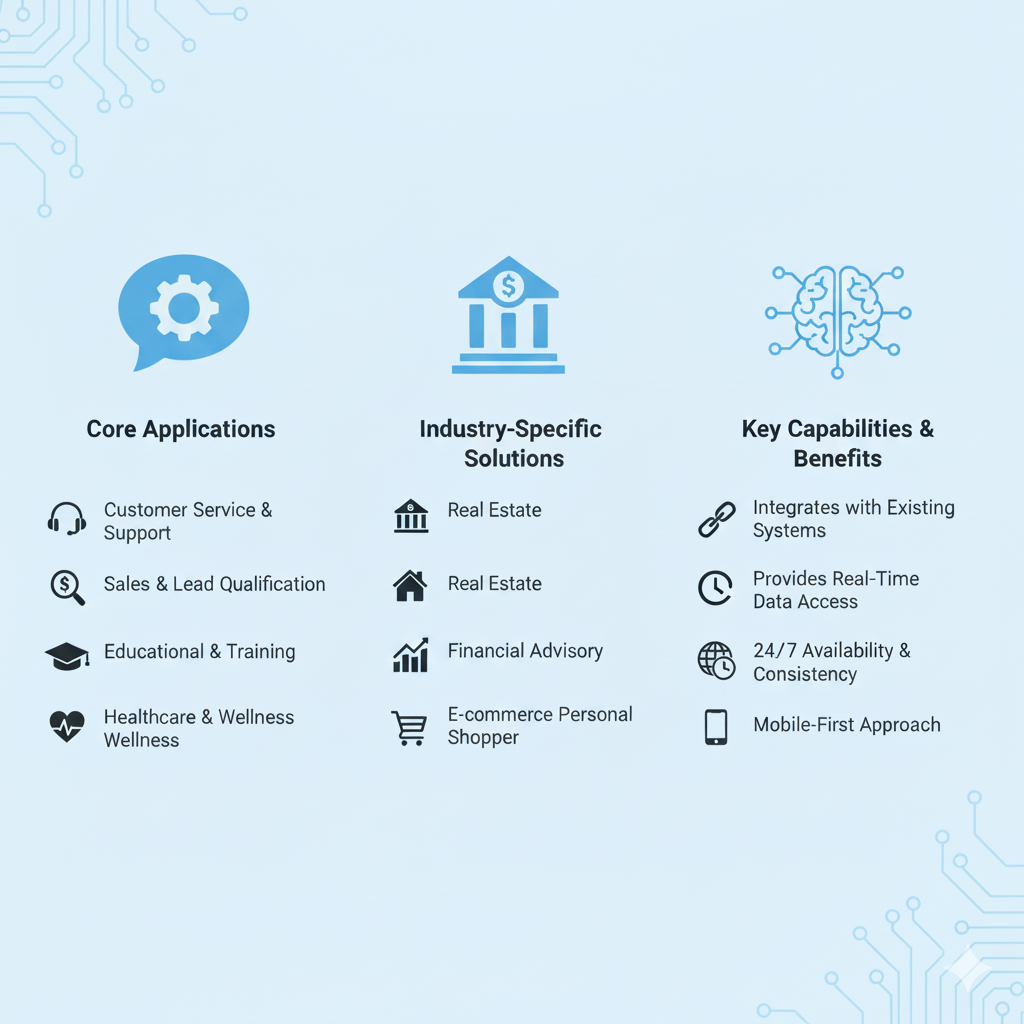
Customer service and support automation
AI-powered help desks are becoming standard for businesses that want to scale without hiring armies of support agents. A well-designed AI agent handles 70-80% of common inquiries automatically.
The key is integration with your existing systems. FlutterFlow AI agents can connect to your customer database, order management system, and knowledge base. When customers ask, "Where's my order?", the AI agent pulls real data and provides accurate answers.
Escalation workflows are crucial. Your AI agent should recognize when issues require human intervention and seamlessly transfer conversations to human agents with full context.
Sales and lead qualification
Conversational commerce is exploding because it works. AI agents can guide customers through product selection, answer technical questions, and even process orders.
But the real value is in lead qualification. An AI agent can have discovery conversations with prospects, gather requirements, and schedule meetings with sales teams, all while you sleep.
I've seen B2B companies increase qualified leads by 45% using AI agents for initial prospect conversations. The AI never has a bad day, never forgets to ask qualifying questions, and works around the clock.
Educational and training applications
AI tutoring systems built in FlutterFlow are particularly powerful because they combine conversational AI with FlutterFlow's rich media capabilities. Students can ask questions, get explanations, and receive personalized learning paths.
Corporate training assistants help employees quickly find information, complete compliance training, and get answers to HR questions. This reduces the burden on internal teams while improving employee experience.
Healthcare and wellness coaching
Health coaching AI agents can provide medication reminders, answer common health questions, and track symptoms. The mobile-first approach means these tools are always available when patients need them.
Mental wellness support is another growing area. AI agents provide 24/7 availability for mental health resources, breathing exercises, and crisis support, though human professional oversight remains essential.
Industry-specific solutions
Real estate AI agents help buyers find properties, schedule viewings, and get neighbourhood information. They connect to MLS databases and provide instant, personalized responses.
Financial advisory AI agents help users understand investment options, track spending, and plan for financial goals. The key is compliance, these agents must follow strict regulatory guidelines.
E-commerce personal shoppers analyze customer preferences, suggest products, and handle the entire purchase journey. They're particularly effective for businesses with large product catalogs.
Not Sure Which AI Provider to Choose?
Stop guessing between OpenAI, Gemini, and Claude. We'll show you which one fits your business needs and budget best.
How to create your first AI agent in FlutterFlow?
Let me walk you through the actual process of building your first AI agent using FlutterFlow's official AI Agent Builder. This is the real step-by-step process, not guesswork.
Step 1: Create your AI agent
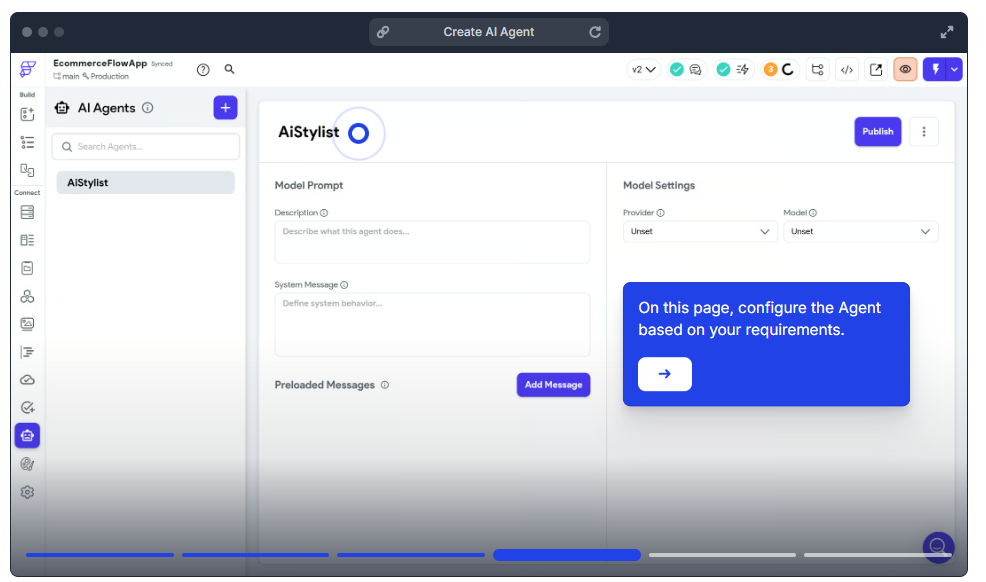
Navigate to the Agents tab from the left-side navigation menu in FlutterFlow, then click the (+) button. Give your agent a descriptive name like "Customer Support Assistant" or "Shopping Helper" and click Create.
Keep in mind the plan limits: you get one AI agent on the Basic plan and unlimited AI agents on the Growth plan and higher.
Step 2: Configure your agent settings
Once created, you'll configure several key sections:
Model Prompt Section
- Description: Write what your AI agent does (this isn't sent to AI models, just for your reference)
- System Message: This is crucial - define your AI's role and behavior. For example: "You are a professional customer service representative for an e-commerce store. Always be helpful, polite, and solution-focused."
Preloaded Messages: Add sample conversations to train your agent. Always include at least one user message and assistant response.
- Role = User "What is your return policy? "
- Role = Assistants: "We offer 30-day returns for unused items. I can help you start a return right now if needed."
Step 3: Choose your AI provider and model
Provider Selection
- Google: Requires Firebase Authentication and Vertiex AI enabled in your Firebase project. No API key needed.
- OpenAI & Anthropic: Requires Firebase Blaze plan (paid) for cloud functions. You'll need to provide your API key.
Model Selection depends on your needs:
- OpenAI GPT-4: Most capable but expensive.
- Google Gemini: Good balance of capability and cost.
- Anthropic Claude: Excellent for analysis and reasoning.
Step 4: Configure input and output options
Request Options. Choose what users can send:
- Text: Standard text messages.
- Image: Photo uploads for visual analysis.
- PDF: Document uploads (Anthropic and Google only)
- Audio: Voice input (Google only)
- Video: Video analysis (Google only)
Response Options
- Text: Plain responses.
- Markdown: Formatted responses with headers, lists, and links.
- JSON: Structured data for programmatic use.
Step 5: Fine-tune model parameters
Temperature: Controls creativity (0.1 = factual, 1.0 = creative). Max Tokens: Limits response length and costs. Top P: Usually keep at default unless you need fine-tuned control
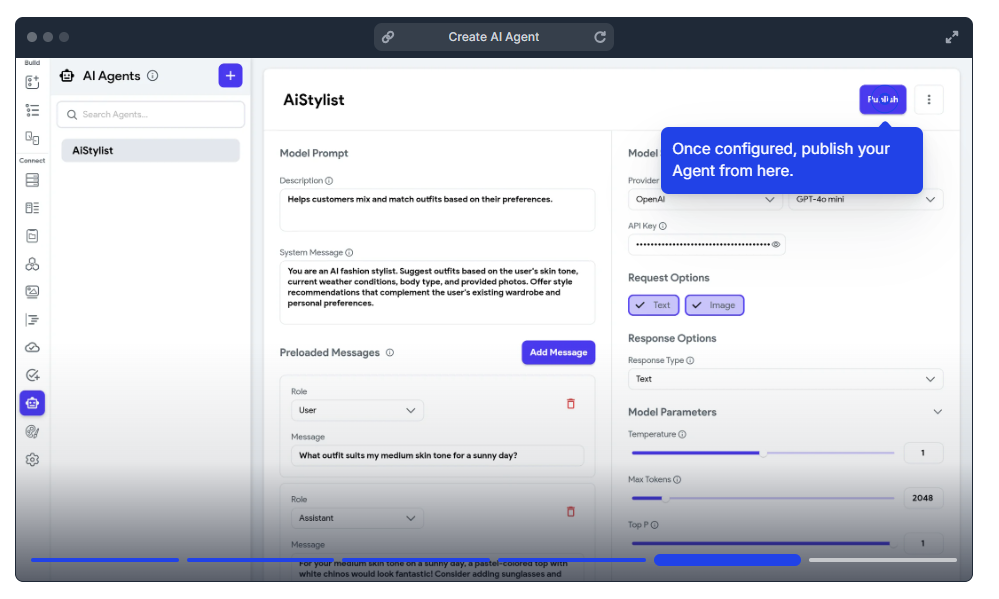
For customer service, use a low temperature (0.1-0.3). For creative applications, use a higher temperature (0.7-0.9).
Step 6: Configure deployment settings
Authentication: Keep ON to restrict access to authenticated users. Timeout: Set based on your agent's complexity (60 seconds is typical.) Memory: 256MB for standard tasks, 512MB+ for complex operations. Min Instances: Set to 0 for cost savings (accepts cold starts). Max Instances: Set based on expected concurrent usage.
Click Publish to deploy your agent.
Step 7: Use your AI agent in your app
Add the Send Message action to buttons, form, or other UI elements:
- Select Agent: Choose your published agent.
- Conversation ID: Use unique IDs to maintain context (e,g, "user123_support_20250115")
- Text Input: Connect to the TextField widget state.
- Action Output Variable: Store the response to display in your UI.
Use the clear chat history action when users want to start fresh conversations.
Important note: For non-Google agents, any configuration changes require redeployment. Google agents update instantly since the configuration is client-side.
Best Practices for AI Agent Development
- Start simple and iterate: Build a basic conversational AI first, then add complexity based on user feedback. Too many features up front lead to confusion and poor user experience.
- Write Clear system instructions: Your AI agent is only as good as its instructions. Be specific about tone, capabilities, and limitations. Test different phrasings and see what works best.
- Plan for edge cases: Users will ask unexpected questions and try to break your AI agent. Have fallback responses and clear escalation paths when the AI can't help.
- Monitor and optimize continuously: Track conversation success rates, user satisfaction, and common failure points. Use this data to refine your AI agent over time.
What are the limitations and Considerations?
Let's be honest about what FlutterFlow AI agents can and can't do. I've seen too many projects fail because expectations weren't aligned with reality.
Current Technical Limitations
- Limited vendor options currently restrict you to Google, OpenAI, and Anthropic. While these cover most use cases, you can't easily integrate specialized AI models or custom-trained systems.
- No function calling yet means AI agents can't directly trigger complex workflows or API calls based on conversation context. This feature is on the roadmap, but not available now.
- Response streaming isn't supported, so users wait for complete responses rather than seeing text appear in real-time. This affects the conversational experience for longer responses.
- Firebase dependency for OpenAI and Anthropic agents adds complexity and costs. You can't deploy these agents without a Firebase backend.
Common Setup Issues and How to Fix Them
After building multiple FlutterFlow AI agent implementations, here are the issues that catch most teams off guard.
Conversation context resets unexpectedly. FlutterFlow gives you a conversationId, but you need to persist and reuse it yourself. Store it in Firestore under each user's session document. If you skip this step, every message starts a new conversation with zero context.
Image uploads fail silently. We've seen FlutterFlow send image uploads as application/octet-stream instead of the correct MIME type. The fix: add a Cloud Function that checks and corrects the MIME type before passing it to the AI provider. This is a known issue in the community.
No error messages when API calls fail. If your API key is invalid, the file is too large, or the model is overloaded, FlutterFlow returns a blank response with no error details. Add error logging through Cloud Functions (use console. error and write failures to a Firestore collection) so your team can diagnose issues without guessing.
Firebase Blaze plan surprise costs. OpenAI and Anthropic agents route through Firebase Cloud Functions, which run on the Blaze (pay-as-you-go) plan. Set budget alerts in the Firebase console before launching, and use min-instances = 0 during development to avoid idle charges.
How to Integrate an AI Agent with Your App Logic?
This is where FlutterFlow AI Agent becomes powerful, when they're integrated into your app's workflows, not sitting as isolated chatbots.
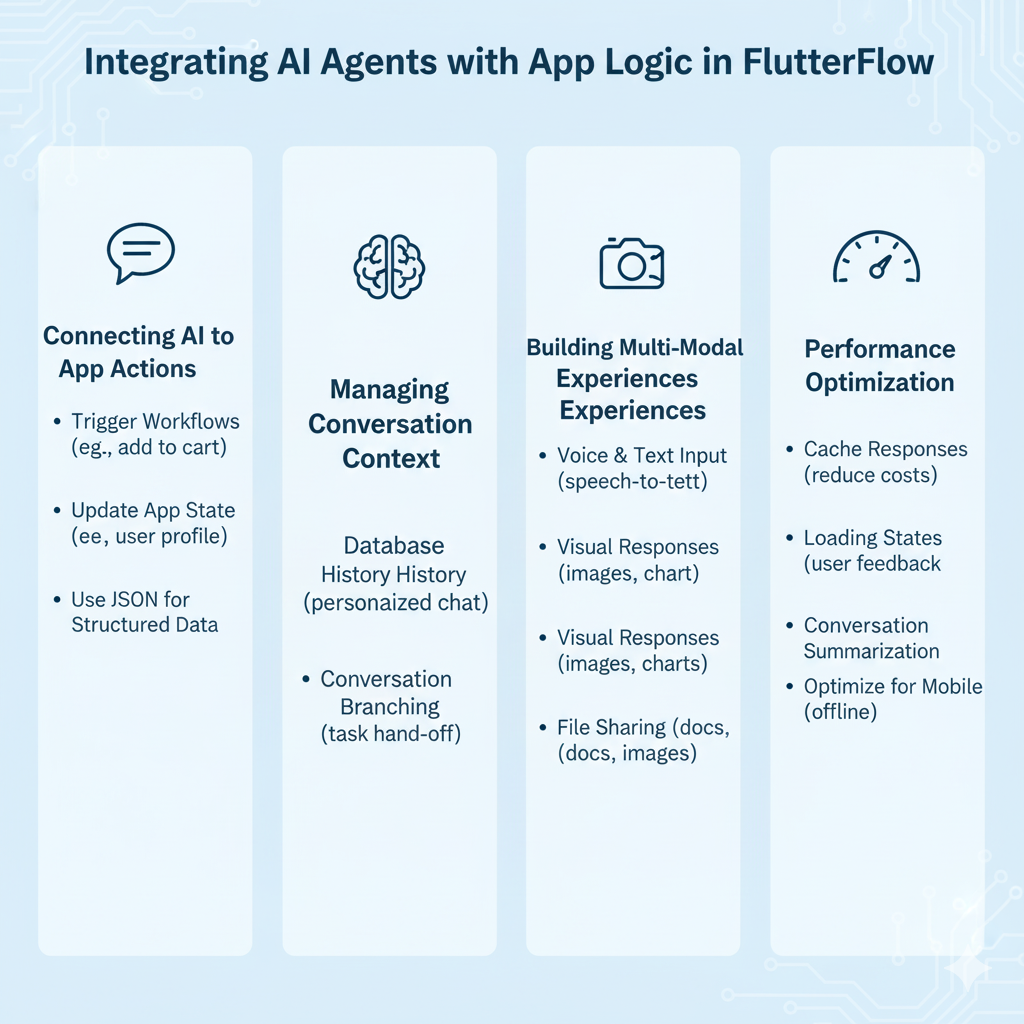
Connecting AI Responses to App Actions
Trigger workflows based on AI conversation. For example, when a customer expresses interest in a product, your AI agent can automatically add it to their cart or schedule a demo.
Update app state from AI interactions. If a user tells your AI agent about a preference change, update their profile immediately rather than requiring separate form submissions.
Use JSON responses for structured data. Instead of just text, have your AI agent return structured data that your app can process and display in custom UI components.
Managing Conversation Context and Memory
Store conversation history in your app's database to provide context across sessions. Users shouldn't have to repeat information every time they interact with your AI agent.
Integrate with user profiles so AI agents have access to relevant user data, preferences, and history. This enables personalized conversations.
Implement conversation branching where AI agents can hand off specific tasks to different parts of your app while maintaining conversational context.
Building Multi-Modal Experiences
Combine voice and text input using FlutterFlow's speech-to-text capabilities. Users can speak to your AI agent and receive text responses, or vice versa.
Add visual elements to AI responses. Show product images, charts, or interactive widgets based on conversation context, not just text.
Enable file sharing so users can send documents, images, or other files to your AI agent for analysis or processing.
Performance Optimization Strategies
Cache common responses to reduce API costs and improve response times for frequently asked questions.
Implement smart loading states that give users feedback during AI processing. Long waits kill conversational experiences.
Use conversation summarization for long interactions to maintain context while controlling token usage and costs.
Optimize for mobile networks by compressing data and handling offline scenarios gracefully.
Ready to Launch Your AI Agent App?
We build custom FlutterFlow AI agents for businesses serious about automation. Let's discuss your project and get you started.
What's Coming Next for AI Agents in FlutterFlow?
FlutterFlow's AI roadmap is aggressive, and understanding what's coming helps you plan better implementations today.
Confirmed Features on the Roadmap
Data types as response outputs will let AI agents return structured data that automatically populates your app's UI components. This bridges the gap between conversation and app functionality.
Tools and function calling, which allows AI agents to trigger specific app actions, API calls, or workflows based on conversation context, is now on FlutterFlow's active development roadmap. This is the feature most requested by the builder community.
Additional AI providers will expand beyond Google, OpenAI, and Anthropic to include specialized models for specific industries or use cases.
Streaming responses will make conversations feel more natural by showing text as it's generated rather than waiting for complete responses.
Image generation capabilities will let AI agents create visual content directly in conversations, which is powerful for creative and marketing applications.
Emerging Trends in Conversational AI
Multimodal AI agents that process text, images, voice, and video simultaneously are becoming standard. FlutterFlow will likely add these capabilities as providers make them available.
AI agent orchestration, where multiple specialized agents work together to handle complex tasks, is gaining traction in enterprise applications.
Personalization engines that adapt AI agent behavior based on individual user patterns and preferences will become more sophisticated.
Preparing for the Future
Design flexible conversation flows that can accommodate new capabilities without complete rebuilds. Avoid hard-coding assumptions about AI limitations.
Invest in data quality because future AI capabilities will depend heavily on clean, structured data about your users and business processes.
Build a community around your AI applications. Users who provide feedback and suggestions will help guide your AI agent's evolution.
Stay close to FlutterFlow's community updates because new AI features are being released frequently, and early adoption provides competitive advantages.
The businesses winning with AI agents aren't just using the technology, they're building sustainable competitive advantages through better user experiences and operational efficiency.
Conclusion
Building AI agents in FlutterFlow isn't just about following the latest tech trend. It's about fundamentally changing how your business interacts with customers and handles routine processes.
The companies I've watched succeed with FlutterFlow AI agents share common characteristics: they start with clear business problems, focus on user experience over technical capabilities, and iterate based on real feedback rather than assumptions.
We've helped dozens of businesses implement FlutterFlow AI agents that reduce costs, improve customer satisfaction, and drive real business results. From customer service automation to sales qualification systems, our FlutterFlow development team knows what works and what doesn't. See our case studies for examples, or contact us to discuss your project.

